Gaussian splat#
A captured Gaussian splat composited into a live Genesis scene, lit by a single directional sun. The cactus is a .ply radiance field; the plane it sits on is a stock gs.morphs.Plane. Both are rendered in the same Nyx frame.
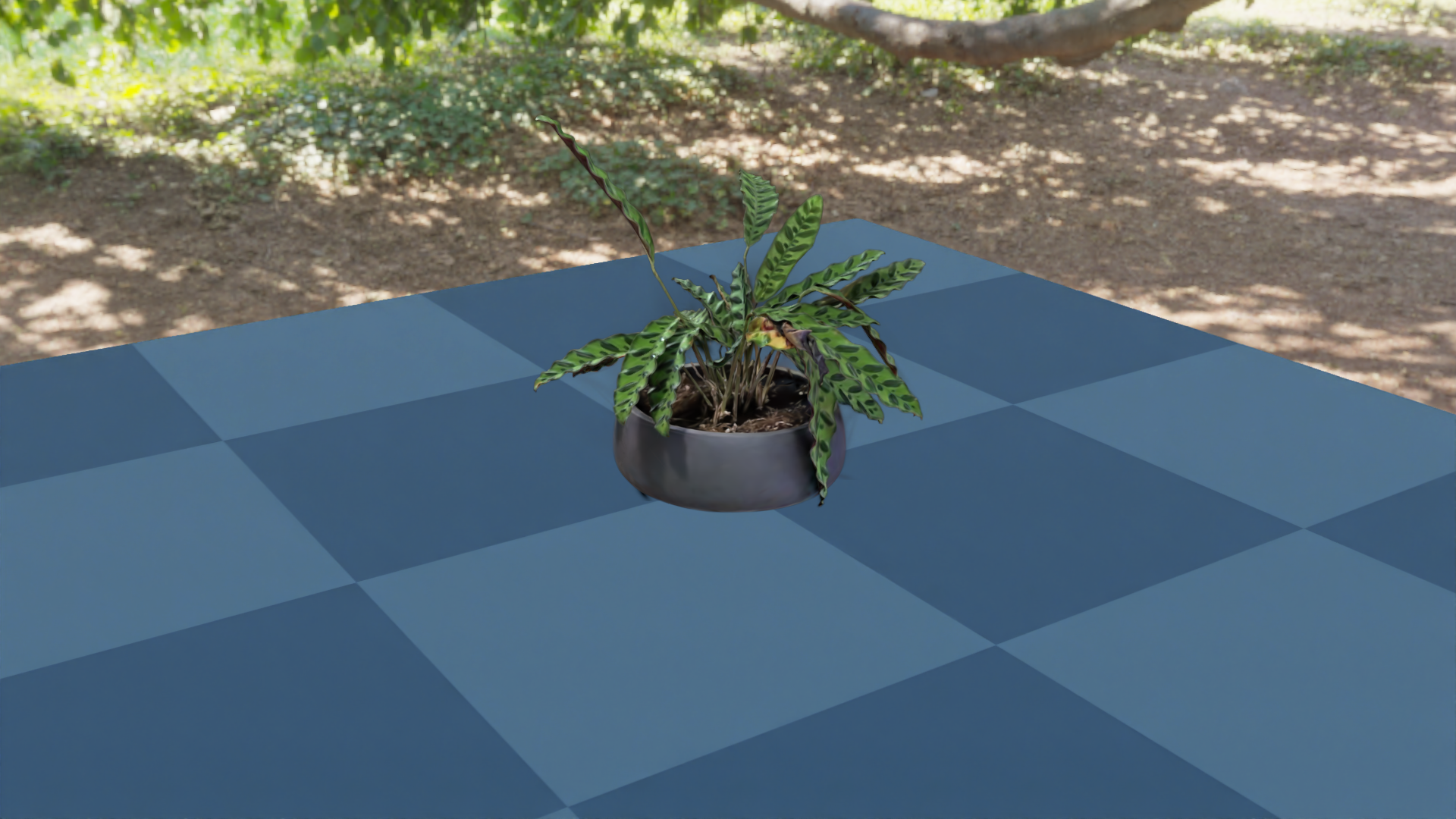
What it shows#
Loading a 3D Gaussian Splatting
.plyfile as aLightFieldAssetand attaching it to the camera throughlight_fields.Mixing the splat with simulated geometry (a Genesis
Plane) lit by a single directional light. The plane is shaded by the sun; the cactus’s appearance is whatever the splat baked in at capture time.
How the splat is declared#
A splat is a LightFieldAsset with ELightFieldType set to GaussianField. Set its uri to a .ply (Inria-style 3DGS) or .spz (compressed) file, then hand it to the camera:
import gs_nyx.nyx_py_sdk as nps

cactus      = nps.LightFieldAsset()
cactus.type = nps.ELightFieldType.GaussianField
cactus.uri  = "examples/assets/cactus.ply"

cam = scene.add_sensor(NyxCameraOptions(
    ...,
    light_fields = [cactus],
))
A few things worth noting:
Splats are not Genesis entities. They never enter the rigid / FEM / MPM solvers, never collide, and have no morph. They live entirely on the renderer side; the only Genesis-facing surface is the
light_fieldsfield of the camera options.Light fields are scene-wide. The plugin collects
light_fieldsfrom every Nyx sensor atscene.build()and merges them into one shared scene description. Declaring the same splat on two cameras isn’t required — and would duplicate it.Format is auto-detected.
.plyfor plain 3DGS output,.spzfor the compressed variant. The extension decides which loader runs; there’s no flag to set.The splat has a transform.
position,rotation(quaternion), and per-axisscaleare all onLightFieldAsset. The defaults — origin, identity, unit scale — keep this example simple, but you can move or resize the cactus by setting them beforescene.build(). See Gaussian splats for the full field list.
Source#
 1"""Gaussian splat example for the Nyx renderer plugin.
 2
 3Renders a captured Gaussian splat (``plant.ply``) sitting on a Genesis
 4``Plane``, lit by the ``green_sanctuary`` HDRI environment map. Demonstrates
 5declaring a ``LightFieldAsset`` on ``NyxCameraOptions.light_fields`` so the
 6radiance field renders alongside simulated geometry every frame.
 7
 8Usage:
 9    uv run python examples/05_gaussian_splat.py
10"""
11
12from __future__ import annotations
13
14import os
15
16from PIL import Image
17
18import genesis as gs
19import gs_nyx.nyx_py_renderer as npr
20import gs_nyx.nyx_py_sdk as nps
21from gs_nyx_plugin.nyx_camera_options import NyxCameraOptions
22
23
24HERE        = os.path.dirname(__file__)
25PLANT_PLY   = os.path.join(HERE, "assets", "plant.ply")
26ENV_MAP     = os.path.join(HERE, "assets", "green_sanctuary_4k.hdr")
27OUTPUT_PATH = os.path.join(HERE, "out", "05_gaussian_splat.png")
28
29
30def main() -> None:
31    gs.init()
32    os.makedirs(os.path.dirname(OUTPUT_PATH), exist_ok=True)
33
34    scene = gs.Scene(
35        sim_options=gs.options.SimOptions(dt=0.01),
36        show_viewer=False,
37    )
38
39    scene.add_entity(morph=gs.morphs.Plane(plane_size=(2.0, 2.0)))
40
41    # The splat is declared on the camera as a LightFieldAsset rather than as
42    # a Genesis entity. light_fields from every Nyx sensor are collected at
43    # scene.build() and rendered alongside simulated geometry.
44    plant          = nps.LightFieldAsset()
45    plant.type     = nps.ELightFieldType.GaussianField
46    plant.uri      = PLANT_PLY
47    # 90° rotation about Z stands the capture upright in Genesis' Z-up world.
48    plant.rotation = nps.quaternion(0.0, 0.0, -0.70710678, 0.70710678)
49
50    # HDRI environment lighting the plane. The splat already has
51    # view-dependent colour baked in, so only the simulated geometry needs
52    # the env map as a light source.
53    env_map            = nps.EnvironmentMapAsset()
54    env_map.texture    = ENV_MAP
55    env_map.layout     = nps.EEnvMapLayout.LongLat
56    env_map.multiplier = 2.0
57
58    cam = scene.add_sensor(NyxCameraOptions(
59        res          = (1920, 1080),
60        pos          = (1.0, 1.5, 0.8),
61        lookat       = (0.0, 0.0, 0.1),
62        fov          = 30.0,
63        spp          = 64,
64        render_mode  = npr.ERenderMode.FastPathTracer,
65        env_maps     = [env_map],
66        light_fields = [plant],
67    ))
68
69    scene.build(n_envs=1)
70    scene.step()
71
72    rgb = cam.read().rgb[0].cpu().numpy()
73    Image.fromarray(rgb).save(OUTPUT_PATH)
74    print(f"Saved {OUTPUT_PATH}")
75
76
77if __name__ == "__main__":
78    main()
Run it:
uv run python examples/05_gaussian_splat.py
The PNG is written to examples/out/05_gaussian_splat.png. The Sphinx build copies it to _static/generated/examples/05_gaussian_splat.png and embeds it at the top of this page, so the docs site always shows whatever the latest run produced.
See also#
Gaussian splats — Full reference for
LightFieldAsset: supported formats, transform fields, tone-mapping guidance.Light types — Reference for the point / directional / spot light schema used here.
Hello, Nyx — The simplest Nyx scene, useful as a contrast for what changes once a splat is involved.