Materials#
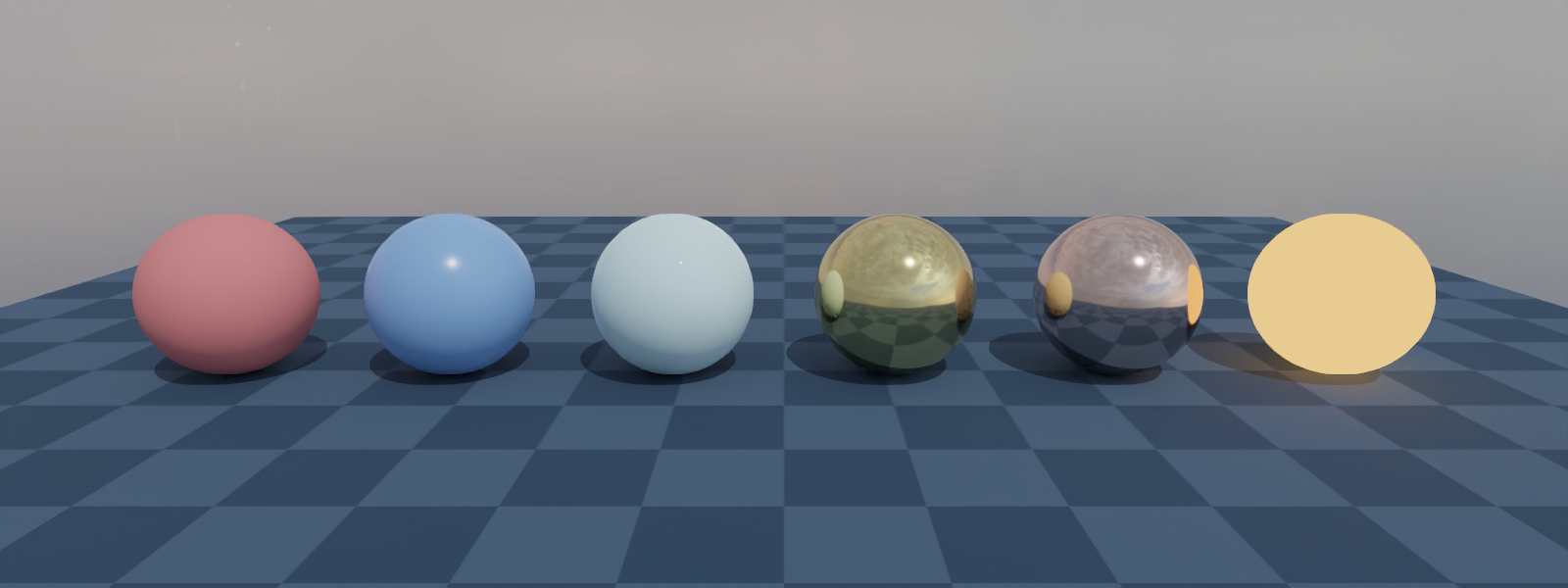
A side-by-side render of the most common gs.surfaces variants on identical spheres. Use this page to get a feel for how each material shades under Nyx before choosing one for your own scene.
What it shows#
Six spheres are laid out in a row on a ground plane. Geometry, lighting, and camera are identical for every sphere, only the surface= argument changes, so each ball is a direct visual sample of one Genesis material:
Sphere |
Surface |
What to look for |
|---|---|---|
1 |
|
Diffuse base colour with a soft, low-intensity specular highlight from the key light. |
2 |
|
Custom PBR: same base colour as plastic but a sharper, blurred reflection of the HDRI. |
3 |
|
Transparency is not supported, glass is rendered as plastic with the given tint. |
4 |
|
Saturated yellow metal reflection of the HDRI, no diffuse component. |
5 |
|
Same metal model as gold with the copper preset’s complex IOR, warmer and less saturated. |
6 |
|
Glowing surface unaffected by the lights or the env map. |
A few things worth noting:
No plugin-specific surface types. Everything passed to
surface=is a stockgenesis.surfaces.*value. The Nyx plugin translates each one to its own material atscene.build(), so anything documented in the Genesis material reference works here unchanged.Metal shortcuts vs.
BSDF.Gold(),Copper(),Iron(), etc. are presets over the same underlying PBR model. Use them when you want a named real-world metal, drop down toBSDF(metallic=..., roughness=...)when you want full control.Emissionignores lighting. The emissive ball stays the same brightness regardless of the env map or the key light. That makes it useful for indicator markers, screens, or any geometry that should read as “self-lit”.Surfaces are single-use. A
gs.surfaces.*instance can only be attached to one entity, which is why the example stores factories (lambda: gs.surfaces.Plastic(...)) rather than pre-built objects.
Source#
  1"""Materials example for the Nyx renderer plugin.
  2
  3Renders a row of spheres, each with a different ``gs.surfaces`` variant, to
  4show how common Genesis materials look when shaded by Nyx. The scene is lit
  5by an HDRI environment map plus a single directional key light so both
  6diffuse and reflective materials read clearly.
  7
  8Usage:
  9    uv run python examples/03_materials.py
 10"""
 11
 12from __future__ import annotations
 13
 14import os
 15from PIL import Image
 16
 17import genesis as gs
 18import gs_nyx.nyx_py_renderer as npr
 19import gs_nyx.nyx_py_sdk as nps
 20from gs_nyx_plugin.nyx_camera_options import NyxCameraOptions
 21
 22
 23HERE        = os.path.dirname(__file__)
 24ENV_MAP     = os.path.join(HERE, "assets", "kloppenheim_07_puresky_4k.hdr")
 25OUTPUT_PATH = os.path.join(HERE, "out", "03_materials.png")
 26
 27
 28# A few representative surfaces: a diffuse plastic, a custom PBR BSDF,
 29# a tinted glass (rendered as plastic, Nyx does not support transparency),
 30# an emissive material, and two metal shortcuts.
 31SURFACES = [
 32    ("plastic",  lambda: gs.surfaces.Plastic(color=(0.85, 0.20, 0.20))),
 33    ("bsdf",     lambda: gs.surfaces.BSDF(color=(0.20, 0.40, 0.85), metallic=0.0, roughness=0.25)),
 34    ("glass",    lambda: gs.surfaces.Glass(color=(0.70, 0.95, 1.00))),
 35    ("gold",     lambda: gs.surfaces.Gold()),
 36    ("copper",   lambda: gs.surfaces.Copper()),
 37    ("emission", lambda: gs.surfaces.Emission(emissive=(4.0, 1.5, 0.4))),
 38]
 39
 40SPHERE_RADIUS = 0.4
 41SPACING       = 1.1
 42SPHERE_Z      = SPHERE_RADIUS
 43
 44CAM_POS    = (0.0, -4.5, 1.5)
 45CAM_LOOKAT = (0.0,  0.0, SPHERE_Z)
 46CAM_RES    = (1600, 600)
 47CAM_FOV    = 35.0
 48
 49
 50def main() -> None:
 51    gs.init()
 52
 53    scene = gs.Scene(
 54        sim_options=gs.options.SimOptions(dt=0.01),
 55        show_viewer=False,
 56    )
 57
 58    scene.add_entity(morph=gs.morphs.Plane(plane_size=(10.0, 10.0)))
 59
 60    # Lay the spheres out along X so the camera frames them in a single row.
 61    x0 = -SPACING * (len(SURFACES) - 1) * 0.5
 62    for i, (_, factory) in enumerate(SURFACES):
 63        scene.add_entity(
 64            morph=gs.morphs.Sphere(
 65                pos=(x0 + i * SPACING, 0.0, SPHERE_Z),
 66                radius=SPHERE_RADIUS,
 67                fixed=True,
 68                collision=False,
 69            ),
 70            surface=factory(),
 71        )
 72
 73    env_map            = nps.EnvironmentMapAsset()
 74    env_map.texture    = ENV_MAP
 75    env_map.layout     = nps.EEnvMapLayout.LongLat
 76    env_map.multiplier = 2.0
 77
 78    key_light = {
 79        "type":      "directional",
 80        "dir":       (-0.3, 0.6, -1.0),
 81        "color":     (1.0, 1.0, 1.0),
 82        "intensity": 3.0,
 83    }
 84
 85    cam = scene.add_sensor(NyxCameraOptions(
 86        res         = CAM_RES,
 87        pos         = CAM_POS,
 88        lookat      = CAM_LOOKAT,
 89        fov         = CAM_FOV,
 90        spp         = 64,
 91        denoise     = True,
 92        render_mode = npr.ERenderMode.FastPathTracer,
 93        env_maps    = (env_map,),
 94        lights      = [key_light],
 95    ))
 96
 97    scene.build(n_envs=1)
 98    scene.step()
 99
100    rgb = cam.read().rgb[0].cpu().numpy()
101    os.makedirs(os.path.dirname(OUTPUT_PATH), exist_ok=True)
102    Image.fromarray(rgb).save(OUTPUT_PATH)
103    print(f"Saved {OUTPUT_PATH}")
104
105
106if __name__ == "__main__":
107    main()
Run it:
uv run python examples/03_materials.py
The PNG is written to examples/out/03_materials.png. The Sphinx build copies it to _static/generated/examples/03_materials.png and embeds it at the top of this page, so the docs site always shows whatever the latest run produced.
See also#
Light types — A complementary scene where the lights vary and the material stays fixed.
Environment maps — HDR image-based lighting (
EnvironmentMapAssetreference).Lights — Point / directional / spot light schema and photometric units.